Table of Contents
Important Notes
- This page describes the configuration of MikroTik 5GHz and 60GHz devices with RouterOS.
- It is assumed that the device already has a base configuration: see RouterOSBaseConfig
- The following steps can be done using WinBox or WebFig.
IP configuration
- Go to IP→Addresses, and add a new IP address
- Enter the IP address and the netmask for the device from the manman database.
- e.g. 10.12.310.2/30 for the address 10.12.310.2 and the netmask 255.255.255.252
- Set the interface to
bridge - Go to IP→Routes
- Add a new route
- Destination address: 0.0.0.0/0
- Gateway: the IP of the router on the interface connected to the wireless device, e.g. 10.12.310.1
5GHz setup
- Edit the interface
wlan1in Wireless→WiFi Interfaces - Set the Mode in the Wireless section
ap bridgefor PtmP AP (master)bridgefor PtP AP (master)stationfor PtP or PtmP station (slave)
- Set the SSID
- for a 5GHz AP:
'ap-<direction>.<location>.ffgraz.net' - for PtP Links:
'<location1>-<location2>.ffgraz.net'- <location1> shold be the AP, <location2> the station
- Set the Frequency:
- TODO
60GHz setup
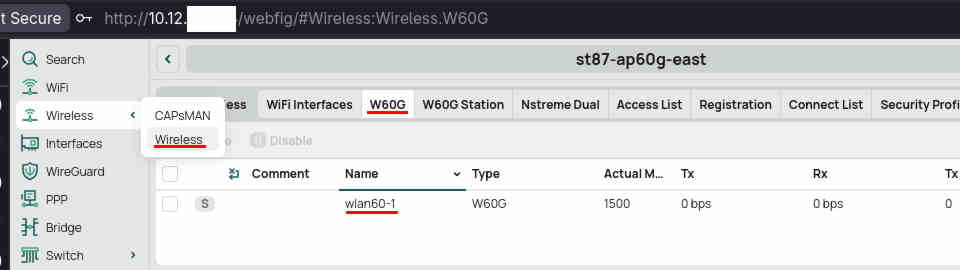
- The settings for 60GHz interfaces can be found in in Wireless→W60G

PtmP AP setup
- Set the Mode in the Wireless section to
ap bridge - Set the SSID. For a 60GHz AP the convention is:
ap-<direction>.<location>.ffgraz.net. Location can be shortened to fit 32 characters. - Set the frequency (see the frequency list below)
PtP AP setup
- Note: in PtP mode only one station can connect to the AP. Some devices such as the WAP60G (Wireless Wire) only allow this mode. However this is only a software limitation, a license key can be bought to upgrade a WAP60G to a WAP60G-AP if needed.
- Edit the interface
wlan60-1 - Set the Mode in the Wireless section to
bridge - Set the SSID according to the convention
<location1>-<location2>.ffgraz.net.location1should be the AP,location2the station.
Station (client) setup
- Note: A station can connect to one AP.
- Edit the interface
wlan60-1 - Set the Mode in the Wireless section of the to
station - Set the SSID and password of the AP you want to connect to. The Scan button on the right side can be used to scan for 60GHz APs.
Checking the connection
- After applying the settings wait for a connection to be established. This can take up to one minute.
- Make sure that the antenna is stable and pointed in the right direction. The other station should be inside the antenna's beam, see this table for the beam width of different devices. 60GHz antennas use beamforming: They can control the direction of the radio waves electronically. When first establishing a connection the device has to scan every direction available to find the best one.
- The Status section of the interface shows information about the 60GHz connection:

- Explanation of the values:
- Signal: Signal quality index (0-100).
- MCS: Modulation coding scheme, a higher value is better. It can vary in normal operation depending on traffic.
- PHY rate: Theoretical maximum rate of the established connection. It can vary in normal operation depending on traffic.
- RSSI: Received Signal Strength indicator. This value should be maximized (it is negative so the absolute value should be minimized).
- TX sector info: showing in which direction the antenna should be adjusted.
- When making an adjustment to the antenna's direction, wait up to 30 seconds for the values to settle. Only adjust one side of a link at a time.
60 GHz frequencies
- Set the Frequency:
- Warning: Frequency can be set to values not supported by the device. Make sure to set a supported frequency otherwise you might lock yourself out by disconnecting a remote device. Use the Safe Mode feature if in doubt.
- The range of a link highly depends on the frequency because of RF attenuation of oxygen.
- For efficient use of channels, try the shortest-range channels first.
- Frequencies in order from high to low attenuation (shorter to longer links):
- 60480MHz
- 62640MHz
- 58320MHz
- 66960MHz
- On devices in AP mode (master), it is recommended to set a fixed frequency to avoid interference with other transmitters on the same site.
- On devices in station mode (slave), the
autosetting is useful as it scans all channels. This way the frequency can be changed on the AP without having to reconfigure the station. This automatic scanning can be a disadvantage for longer links that might be interrupted more often, as reconnecting will take longer.
- Set the Region: Some frequencies are only allowed in some regions